






Think about having a secret weapon on your product team—a tireless partner that can sift through market trends in seconds, suggest elegant code fixes, and even help you anticipate what your users want next. This isn’t a far-off dream; it's the practical reality of using AI for product development. What was once a specialized tool is now becoming a core part of how we build things.
How AI Is Reshaping Product Development
Artificial intelligence is quickly becoming the engine room for high-performing product teams. It gives them abilities that, until recently, were either too expensive or just took too long to be practical. The goal isn't to replace the brilliant minds on your team, but to supercharge them.
Think of AI as an incredibly competent assistant. It handles the tedious, repetitive work, freeing up your team to focus on what humans do best: strategy, creative problem-solving, and understanding the nuances of customer needs.
Nowhere is this shift more obvious than in software engineering. It has become the top field for AI adoption, and for good reason. Companies consistently find that using AI in software development brings real, measurable cost savings and a solid return on investment. In fact, 64% of organizations now say AI is directly fueling their innovation, as highlighted in this comprehensive trend report. It's clear this is more than just a passing trend.
AI's Role Across The Product Lifecycle
AI isn't just a tool for one specific task; its impact is felt from the very first glimmer of an idea all the way through a product's life in the market. This creates a much more data-driven and cohesive workflow.
- Ideation & Market Research: AI can digest thousands of customer reviews, support tickets, and social media posts to uncover hidden pain points and promising opportunities you might have missed.
- Design & Prototyping: With generative AI, designers can spin up initial wireframes, UI mockups, and even entire design systems from a few text prompts, which dramatically speeds up the early creative process.
- Engineering & Coding: AI coding assistants like GitHub Copilot offer real-time code suggestions, write boilerplate functions, and help untangle tricky bugs, giving developers a serious productivity boost.
- Quality Assurance & Testing: AI-driven tools can automatically create test cases for obscure edge scenarios, run visual regression tests, and even predict which areas of your code are most likely to have bugs.
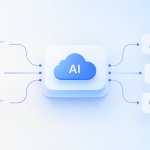
The diagram below shows how AI creates a powerful feedback loop, connecting market data, code creation, and user needs.

As you can see, AI acts as the central hub, turning raw information into refined solutions that hit the mark with users.
To better visualize this, the following table breaks down AI's specific contributions at each stage of the development journey.
AI's Impact Across the Product Development Lifecycle
| Lifecycle Stage | Key AI Application | Primary Benefit |
|---|---|---|
| Ideation & Research | Analyzing customer feedback, market trends, and competitor data | Faster, data-backed validation of ideas and discovery of unmet needs |
| Design & Prototyping | Generating UI mockups, wireframes, and user flows from text prompts | Accelerated design exploration and rapid visualization of concepts |
| Engineering | Code completion, bug detection, automated documentation, and refactoring | Increased developer productivity and improved code quality |
| QA & Testing | Automated test case generation and intelligent bug prioritization | More comprehensive test coverage and faster bug resolution cycles |
| Launch & Analytics | Predicting user churn, analyzing engagement patterns, and A/B testing | Deeper insights into user behavior and optimized post-launch performance |
| Personalization | Creating dynamic user experiences and tailored content recommendations | Higher user engagement, satisfaction, and retention |
This table shows that AI isn't just a single-point solution; it's a thread that can be woven through the entire fabric of product creation to make it stronger and more efficient.
The New Collaborative Reality
This new way of working starts to dissolve the traditional barriers between teams. The old model of siloed handoffs from product to design to engineering is giving way to a more fluid, collaborative environment.
A product manager can now use an AI tool to instantly check an idea against market data while a designer is already generating mockups for it. This creates a shared, accelerated workflow where everyone is on the same page from the start.
AI doesn't change the core responsibilities of a product manager—understand problems, prioritize solutions, and facilitate creation—but it fundamentally changes how you execute each one. The problems you can solve and the solutions you can build have both expanded dramatically.
Ultimately, your approach to building products has to adapt. By embracing AI for product development, you're not just staying current; you're setting your team up to lead the charge in building truly valuable, user-focused products.
2. Speed Up Ideation and Sharpen Your Design Process
The real work of building a great product begins long before anyone writes a single line of code. It starts in the ideation and design phase, where you wrestle with raw ideas and try to shape them into something real. Traditionally, this has been a slow, manual grind—poring over feedback spreadsheets, running endless interviews, and sketching out countless design variations.
But now, AI is giving this entire creative front-end a serious boost.
Think of AI not as a replacement for your product managers and designers, but as a force multiplier for their creativity. It doesn't take over strategic thinking or user empathy. Instead, it gives your team the power to explore, validate, and visualize ideas faster than ever before. This isn't just about moving quicker; it's about making smarter, data-backed calls from day one.
Find the Hidden Gems in Your Customer Data
Most product teams are sitting on a mountain of unstructured data—customer reviews, support chat logs, survey responses, and call transcripts. Trying to make sense of this manually is a Herculean task, which means priceless insights often get buried. This is where AI, and Large Language Models (LLMs) in particular, really shine.
Imagine you could feed an LLM thousands of your latest app store reviews. In minutes, it could read all of them and hand you a summary of the top five customer pain points, complete with direct quotes to back it up. Suddenly, your product managers have a clear, evidence-based roadmap for what to build next.
A product manager's job has always been to understand customer problems, prioritize them, and help the team build solutions. AI doesn't change that core mission, but it completely changes how you do each of those things.
With the right tools, you can now analyze all that qualitative feedback to:
- Spot emerging trends: Catch recurring themes and feature requests in customer conversations before they blow up.
- Build data-driven personas: Move beyond anecdotal sketches and generate detailed user personas straight from raw survey data.
- Pinpoint friction points: Analyze support tickets to see exactly where users are getting stuck, giving your UX team a clear target for improvements.
This capability transforms a slow, quarterly research project into something that feels more like a real-time feedback loop. Your team stays focused on solving the problems that matter most, right now.
From Idea to Prototype in a Fraction of the Time
Once you've got a validated idea, the next challenge is making it visual. Here again, generative AI is making a huge difference in the design workflow. Instead of staring at a blank screen, designers can now use simple text prompts to generate a whole spectrum of creative assets almost instantly.
This opens the door to exploring concepts that would have been too time-consuming to even consider before. A designer can take a simple prompt like, "Create a modern, minimalist dashboard UI for a financial analytics app," and get a dozen distinct design directions back in minutes. This leads to richer team conversations and, ultimately, more creative final designs.
Today, AI tools are helping teams generate:
- Mood Boards: Quickly pull together visual inspiration to set the aesthetic for a new product or feature.
- Wireframes and User Flows: Generate foundational layouts and map out user journeys from a simple text description.
- High-Fidelity Mockups: Take basic wireframes and flesh them out into polished, realistic mockups, complete with components and placeholder content.
Some of the most exciting tools can even translate a design mockup directly into front-end code. To see just how this works, we break down the process in our guide on how to turn a screenshot into functional code. This bridge from design to development is incredibly powerful. At the end of the day, AI handles the repetitive, tedious tasks, freeing up your designers to focus on what they do best: high-level user experience and creative problem-solving.
Accelerate Engineering And QA With Automation

After an idea makes its way through design, it’s time for the engineering and quality assurance (QA) teams to build it. This is where AI for product development shifts from a brainstorming partner to a hands-on tool, right in the trenches with your developers and testers.
The mission is straightforward: offload the repetitive, soul-crushing tasks that drain your engineering team's time. This frees them up to focus on what really matters—architecting elegant solutions, cracking tough problems, and innovating. That's where the true value lies.
Your Engineering Team’s New Co-Pilot
The biggest game-changer for developers lately has been the arrival of AI code assistants. Tools like GitHub Copilot or Amazon CodeWhisperer work like a seasoned pair programmer, offering smart suggestions directly inside the code editor.
But this goes way beyond simple autocomplete. These AI models have been fed billions of lines of code, so they grasp the context of what a developer is trying to do. They can spin up entire functions, handle all the boilerplate setup, or even suggest better algorithms on the fly. A developer can simply write a comment like, “// function to validate an email with regex,” and the AI spits out the code in seconds.
This fundamentally changes a developer's workflow. When you're not constantly pausing to look up syntax or write the same setup code for the hundredth time, you can stay in a state of deep focus and solve the real problem at hand.
And the help doesn't stop once the initial code is written. AI assistants are quickly becoming essential for:
- Untangling Knotty Bugs: A developer can highlight a confusing block of code and ask the AI to explain it, spot potential errors, or even propose a fix.
- Translating Between Languages: Have an old Python script that needs to be rewritten in JavaScript? AI can do the heavy lifting, drastically cutting down the manual refactoring work.
- Automating Unit Tests: Writing good tests is non-negotiable for quality, but it's also a grind. AI can look at a function and instantly generate the test cases needed to make sure it's solid.
A Smarter Approach To Quality Assurance
Quality assurance is the other side of the coin, and it’s just as ready for an AI-powered boost. So much of traditional QA involves manual, repetitive clicking that’s not only slow but also susceptible to human error. AI injects a much-needed layer of intelligence and automation into the process.
This isn’t just about making old tests run faster; it's about testing smarter. These tools can analyze user behavior and recent code changes to predict which parts of your app are most likely to break. This lets your QA team focus their precious time on the high-risk areas.
Elevating The Testing Process With AI
AI turns testing from a reactive chore into a proactive quality strategy. By automating not just the execution but also the creation of tests, you find more bugs long before they ever get near a user. If you want to go deeper, you can find a complete breakdown of modern automated testing tools and their capabilities.
Here’s how AI is leveling up the QA lifecycle:
- Intelligent Test Case Generation: AI can actually look at your app’s user interface and requirements to automatically dream up test scenarios, including weird edge cases a human might never think to try.
- Visual Regression Testing: These tools take pixel-perfect snapshots of your app's UI and use AI to spot any unintended changes. If a new line of code accidentally shifts a button or changes a color, the system flags it immediately.
- Self-Healing Tests: Ask any test engineer—the worst part of automation is maintenance. When a developer changes a button's ID, old test scripts break. AI-powered tools are smart enough to recognize that it's the same button and automatically "heal" the test, saving engineers from hours of tedious updates.
By weaving AI into both your engineering and QA workflows, you create a virtuous cycle. Developers ship better code faster, and smarter testing ensures that code is rock-solid from day one. This one-two punch is how modern product teams build and release at high speed.
How To Build Your AI Tech Stack

Getting started with AI is one thing; doing it right means picking the right tools. Building your AI tech stack can feel overwhelming, with a constant stream of new platforms and models. This section will help you cut through the noise and assemble the essential components for bringing AI into your product development workflow.
Think of it like building with LEGOs. You need a solid base to build on—those are your foundational models. Then, you have all the specialized pieces that bring your creation to life. Those are the specific tools for design, coding, or data analysis.
H3: Foundational Models: The Core Of Your Stack
The real engine behind any AI feature is its foundational model. These are the massive AI systems you’ve heard about, like OpenAI’s GPT series or Google’s Gemini, which have been trained on incredible amounts of data. They provide the raw intelligence that your more focused applications will tap into.
You have two main paths for accessing this power:
- APIs (Application Programming Interfaces): This is the most common route. You simply connect to a model hosted by a provider like OpenAI, Anthropic, or Google. It’s quick, surprisingly cost-effective, and you get the latest and greatest models without having to manage a single server.
- Open-Source Models: For teams that need complete control, models like Llama or Mistral can be downloaded and run on your own infrastructure. This is great for data privacy and deep customization, but be prepared for a serious investment in hardware and expertise.
The market for these tools is exploding. The generative AI software space is expected to grow with a 29% CAGR, jumping from $63.7 billion in 2025 to an incredible $220 billion by 2030. This in-depth AI market report shows that for your team, the options will only get better and more accessible.
H3: Specialized AI Tools For Every Stage
While foundational models are the brains of the operation, specialized tools are the skilled hands. These are often built on top of a powerful model but are packaged in a way that’s perfectly suited for a specific job, whether that’s generating wireframes or hunting for bugs.
The real secret is matching the right tool to the right task. You wouldn’t use a sledgehammer to hang a picture frame, and you don’t need a massive, general-purpose model for a simple task if a specialized tool can do it faster and cheaper.
To give you a clearer picture, we've organized some of the most essential tools by their function in the product development lifecycle. If you want an even more detailed look, you should check out our guide on the best AI tools for product managers.
Here’s a quick-glance table to help you understand the landscape of tools available.
Essential AI Tools for Your Product Development Stack
| Tool Category | Primary Function | Example Tools / Platforms |
|---|---|---|
| Foundational Models | General-purpose intelligence for text, code, and image generation. | GPT-4, Gemini, Claude 3, Llama 3 |
| Code Assistants | In-IDE code completion, bug detection, and automated refactoring. | GitHub Copilot, Amazon CodeWhisperer, Tabnine |
| Design & Prototyping | Generating wireframes, UI mockups, and design assets from prompts. | Midjourney, Galileo AI, Uizard |
| Data Analysis | Summarizing user feedback, analyzing survey data, and spotting trends. | Julius AI, Polymer, Notably |
| QA & Testing | Automated test case generation and visual regression testing. | Applitools, Testim, Functionize |
Ultimately, choosing the right tools comes down to balancing four things: integration (how well it plays with your current systems), scalability (if it can grow with you), cost, and the learning curve for your team.
My advice? Start small. Pick a high-impact, low-complexity tool like a code assistant and see the results for yourself. You can always expand your AI toolkit as your team gets more comfortable and your needs evolve.
Measuring the ROI of AI in Product Development

Bringing AI into your product development workflow is a serious commitment of time and resources. Sooner or later, stakeholders are going to ask the inevitable question: "What are we getting for our money?" To get buy-in for the long haul, you have to show them a clear, measurable return.
The key is to draw a straight line from your AI tools to real business outcomes. This isn't just about showing off a cool new technology; it's about proving that AI is a powerful driver of growth and efficiency. By setting a clear baseline before you start and tracking your progress, you can build a data-driven story that speaks for itself.
Start with Team Performance: Measuring Engineering Efficiency
The first place you'll see an impact is within your engineering team. Measuring the return on investment starts with picking the right Key Performance Indicators (KPIs) that capture both the speed and quality of your team's work. Forget vanity metrics—focus on the numbers that directly reflect your team’s throughput.
Here are the core metrics that truly matter:
- Developer Velocity: This is all about how much high-quality work your team can get done. As AI assistants take over routine tasks and boilerplate code, you should see your team knocking out more complex story points each sprint.
- Cycle Time: How long does it take to get a task from "in progress" to "done"? AI should shrink this window by accelerating coding, testing, and even code reviews.
- Bug Fix Turnaround Time: Track the average time between a bug being reported and the fix being deployed. AI-powered diagnostics can slash this time dramatically.
- Deployment Frequency: A steady increase in how often you can ship code is a fantastic sign of a healthier, more efficient development pipeline.
The potential here is massive. PWC predicts that AI could add $15.7 trillion to the global economy by 2030, with a huge chunk of that—$6.6 trillion—coming from pure productivity gains. For individual companies, revenue growth from AI is most often seen in product and service development. You can find more data in this 2024 AI statistics report.
Translate Efficiency Gains into Business Impact
While making your team faster is a great start, the real win is how that speed translates to a better product and a stronger business. This is where you connect the dots for leadership, showing them how engineering improvements create tangible value.
For instance, a faster development cycle isn't just a nice-to-have; it means you beat competitors to market.
Key Product-Centric Metrics to Track:
- Time-to-Market for New Features: How fast can you move an idea from the whiteboard to your customers' hands? AI can shave time off every single stage, from design mockups to the final QA checks.
- User Engagement with AI-Powered Features: When you launch a feature that uses AI, watch its adoption and engagement rates closely. If users are flocking to it, you've clearly created value.
- Reduction in Development Costs: This one is straightforward. Calculate the cost savings based on the hours your engineers aren't spending on manual tasks like writing unit tests or hunting for bugs.
- Increase in Customer Satisfaction: Keep an eye on your Net Promoter Score (NPS) and customer satisfaction (CSAT) scores. Faster bug fixes, more innovative features, and a more stable product will almost always lead to happier customers.
By tracking these KPIs, you create a powerful feedback loop. You’ll be able to prove the value of your initial experiments and build a rock-solid business case for using AI across your entire product lifecycle.
Navigating The Future Of AI In Product Teams
Bringing AI into your product development process is about more than just shiny new tools. It's a huge step that gives your team powerful new abilities, and with that power comes a serious need for responsibility. As you start plugging into cloud-based AI services, you're also opening the door to some tricky ethical and security questions that you can't afford to ignore.
The most pressing issues right out of the gate are data privacy and intellectual property (IP). Think about it: when your developers feed proprietary code into a third-party AI to get help with debugging, where does that code go? Is it being absorbed into their next model update? Without firm rules, you could be accidentally leaking your secret sauce or sensitive customer information.
This isn’t something you can leave up to individual team members to figure out. You need clear, decisive guidance from the top. The first, most critical step is creating a formal AI Usage Policy. This document needs to be crystal clear about which tools are approved for use, what kinds of data are off-limits for sharing, and exactly how to handle any code the AI generates.
Establishing Guardrails For Responsible AI
A solid policy is much more than a list of do's and don'ts. It sets the standard for how your team should think about and interact with AI, helping you get ahead of potential problems before they blow up. It’s all about building and maintaining trust—both within your team and with your customers.
Your policy should tackle these key areas head-on:
- Data Privacy: Insist on using enterprise-level AI tools that guarantee zero-data-retention. This ensures your proprietary code and internal data aren’t being used to train someone else's model.
- Mitigating Bias: AI models learn from massive amounts of data, and that data is often full of historical and societal biases. You have to train your team to be skeptical and critically review AI outputs, especially when it comes to things like user personas or customer feedback analysis, to avoid baking old stereotypes into your product.
- IP Protection: Set up a clear process for reviewing and "humanizing" any code that comes from an AI. Code that a developer significantly refactors, integrates, and improves is far more defensible as your own IP than something that was just copied and pasted.
AI is a technology, not a magical elixir. It won't solve systemic problems on its own. Adding AI into a broken system won't fix it; it will likely just accelerate the existing issues. The real opportunity is to use this moment of change to redesign how your team works.
The Next Wave Of AI In Product Development
While we're busy sorting out today's challenges, the future of AI for product development is already taking shape. The tools we’re using right now are just the beginning. The next generation of AI will be smarter, more independent, and woven much more deeply into how we build things.
We are shifting from having simple AI assistants to working with true AI collaborators. Just imagine an AI agent that can take a high-level product requirement and then run with it—writing the code, creating the tests, deploying the feature, and even monitoring its performance. This isn't science fiction; it’s where the technology is headed.
Another huge leap on the horizon is multi-modal AI. These are models that don't just understand text or code. They can process and connect text, images, voice, and data all at once. A product manager could verbally describe a new feature, show the AI a napkin sketch, and get back a working prototype complete with the necessary code and design files.
By getting a handle on these ethical considerations and keeping an eye on what’s next, you can set your team up not just to survive the changes ahead, but to truly thrive.
Of course. Here is the rewritten section, designed to sound completely human-written and natural.
Answering the Tough Questions About AI in Product Development
So, you're intrigued by the potential of AI, but a lot of questions are probably swirling around. That's completely normal. Whenever a major new technology comes along, it’s natural to feel a mix of excitement and skepticism.
Let's tackle some of the most common questions and concerns we hear from product teams who are just getting their feet wet with AI.
We’re a Small Team. Where on Earth Do We Start?
When you’re a small team, you can't afford to boil the ocean. You need to find the low-hanging fruit—the spots where you can get a significant win without a massive engineering lift. This builds momentum and proves the value of AI right away.
The easiest entry point? AI code assistants. Tools like GitHub Copilot or Amazon CodeWhisperer plug right into your developers' existing workflow. The learning curve is practically zero, but the productivity boost from day one is real. They're great for churning out boilerplate code and helping untangle tricky bugs.
Another fantastic starting point is using generative AI for brainstorming and research. Your product manager can fire up a tool like ChatGPT to:
- Generate a dozen different user stories for an upcoming feature.
- Get a quick summary of a week's worth of messy customer feedback from Zendesk.
- Draft some initial marketing copy for a new launch.
These tasks take almost no technical setup but can give your team back hours of their week, freeing them up to think bigger.
Is AI Going to Replace Product Managers and Developers?
This is the big one, isn't it? The fear that we’re all just training our eventual replacements. The short answer is no. The consensus is that AI will augment, not replace, these essential roles.
Think of it this way:
AI is the telescope, not the star. You can use it to observe your customers and collect data. But AI isn’t the end result. It’s the tool you use to understand your users, make better decisions, and deliver huge value to your customers.
AI is fantastic at sifting through mountains of data and handling repetitive tasks. But it completely lacks the creative spark, user empathy, and strategic thinking that separate a great product manager from a good one.
Product managers will find themselves spending less time on data-crunching and more time on high-level strategy. Developers will use AI as a tireless pair programmer, helping them write and debug code faster so they can focus on solving tough architectural problems. The jobs aren't going away; they're just evolving to be less about the grunt work and more about what humans do best.
How Do We Handle Data Privacy and Our IP with These Tools?
This is, without a doubt, one of the most critical hurdles to clear. Your first stop should always be the terms of service for any AI tool you're considering. Look specifically for their data usage and retention policies. Thankfully, many enterprise-focused tools now offer zero-data-retention options, meaning they won't train their models on your proprietary code or business plans.
You absolutely need to set up clear internal rules about what can and can't be shared. Create a simple policy that explicitly forbids pasting sensitive customer PII, secret API keys, or unreleased IP into public AI chatbots. For anything highly sensitive, you might want to look into privately hosted open-source models, which give you total control over the data environment.
What’s the Biggest Mistake Teams Make When Starting Out?
The single biggest mistake we see is treating AI like magic pixie dust. Teams get excited and try to "add AI" to their product without a clear purpose, which almost always leads to wasted time, poor results, and a solution looking for a problem.
Don't start by asking, "How can we use AI?"
Instead, you need to be asking, "What is our biggest bottleneck, and can AI help solve it?"
Maybe your ideation cycles are painfully slow. Maybe your QA team is buried in a bug-fix queue. Or maybe your code quality is inconsistent. When you start with a real, well-defined problem, you ensure that your AI initiatives deliver measurable value right from the start.
At AssistGPT Hub, we're focused on bridging the gap between understanding AI and actually putting it to work. If you're ready to build and scale your team's AI capabilities, explore our in-depth guides and resources at https://assistgpt.io.











Add Comment